
Integration Guide
Emergency Logs
Operational tracking software for fire and EMS
Put your Emergency Logs data on the screens in your stations — apparatus status, daily and weekly check compliance, narcotics log sign-offs, out-of-service units, and open trouble tickets, all live and all without anyone walking over to a computer to look it up.
What we can put on your dashboard
Emergency Logs builds a board from your live system data, and we display it on your First Arriving dashboard. Because the board is built to your specifications, you tell Emergency Logs which of the following you want on it — and you can have more than one board, each aimed at a different audience.
Fleet Status
What’s in service right now
Your stations and their apparatus, current apparatus status, reserve status, and a running out-of-service list.
Compliance
What’s been done, what hasn’t
Daily, weekly, and monthly apparatus check status, plus narcotics log sign-offs shown as complete or outstanding.
Maintenance
Where the problems are
Trouble ticket counts broken out by station or by individual apparatus.
By Role
Boards built for the job
A fleet board for your fleet manager, an inventory board for inventory, an EMS board for EMS — each showing only what that role needs.
How this integration works: Emergency Logs designs and hosts the board itself, then gives you a link to it. We place that link on your dashboard. That means the layout and content of the board are set by Emergency Logs to your specifications — so if you want to change what’s on it later, you’ll go back to their support team rather than editing it in First Arriving.
Example screens
A Daily Check Status board, built by Emergency Logs and shown on a First Arriving dashboard.
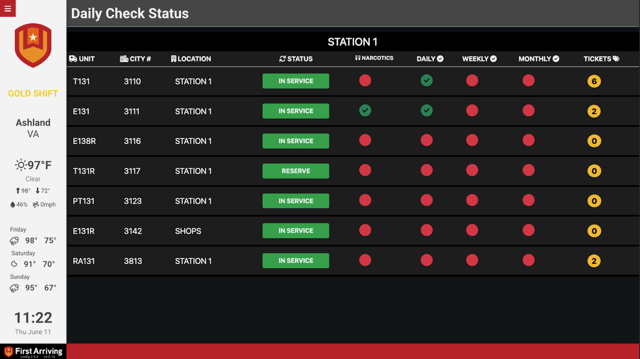
Daily Check Status, broken out by station.
Feature by feature
Use this list when you talk to Emergency Logs about what you want on your board. Anything in your Emergency Logs system can potentially be displayed — these are the views agencies ask for most.
Apparatus and Fleet
Stations and Associated Apparatus
A roster of your stations with the apparatus assigned to each — the foundation most other views build on.
- Full list, or scoped to the stations that matter for a given screen
Apparatus Status
Current status of your apparatus, at whatever scope fits the screen.
- Show globally across the whole department
- Or per station, so each house sees its own rigs
Reserve Status
Which reserve apparatus are available and where they stand — useful on a fleet or operations screen when front-line units start going down.
Out of Service Units
A running list of units currently out of service, so it’s visible to everyone instead of living in one person’s inbox.
Checks and Compliance
Apparatus Check Status
Whether required checks have been completed, shown where the crew will actually see it.
- Covers daily, weekly, and monthly checks
- Break out per apparatus, per station, or both
Narcotics Log Sign-Offs
Whether narcotics log sign-offs have been completed or are still outstanding — a standing accountability item made visible without anyone having to ask.
Maintenance
Trouble Ticket Counts
Open trouble ticket volume, so patterns show up before they become a conversation.
- Count per station
- Count per apparatus
Role-Based Boards
Boards Built Around a Role
Rather than one board that tries to serve everyone, Emergency Logs can build separate boards aimed at the person responsible.
- A fleet board for fleet managers
- An inventory board for inventory managers
- An EMS board for EMS managers
- Other role-specific boards on request
How to get started
This one starts on the Emergency Logs side, since they build the board from your system data. Four steps.
Questions about which board belongs on which screen? Open a ticket at our support center or reach us at dashboards@firstarriving.com and we’ll work through it with you. For changes to the board’s content or layout, contact Emergency Logs support directly.