
Integration Guide
Narcbox by EMS Logik
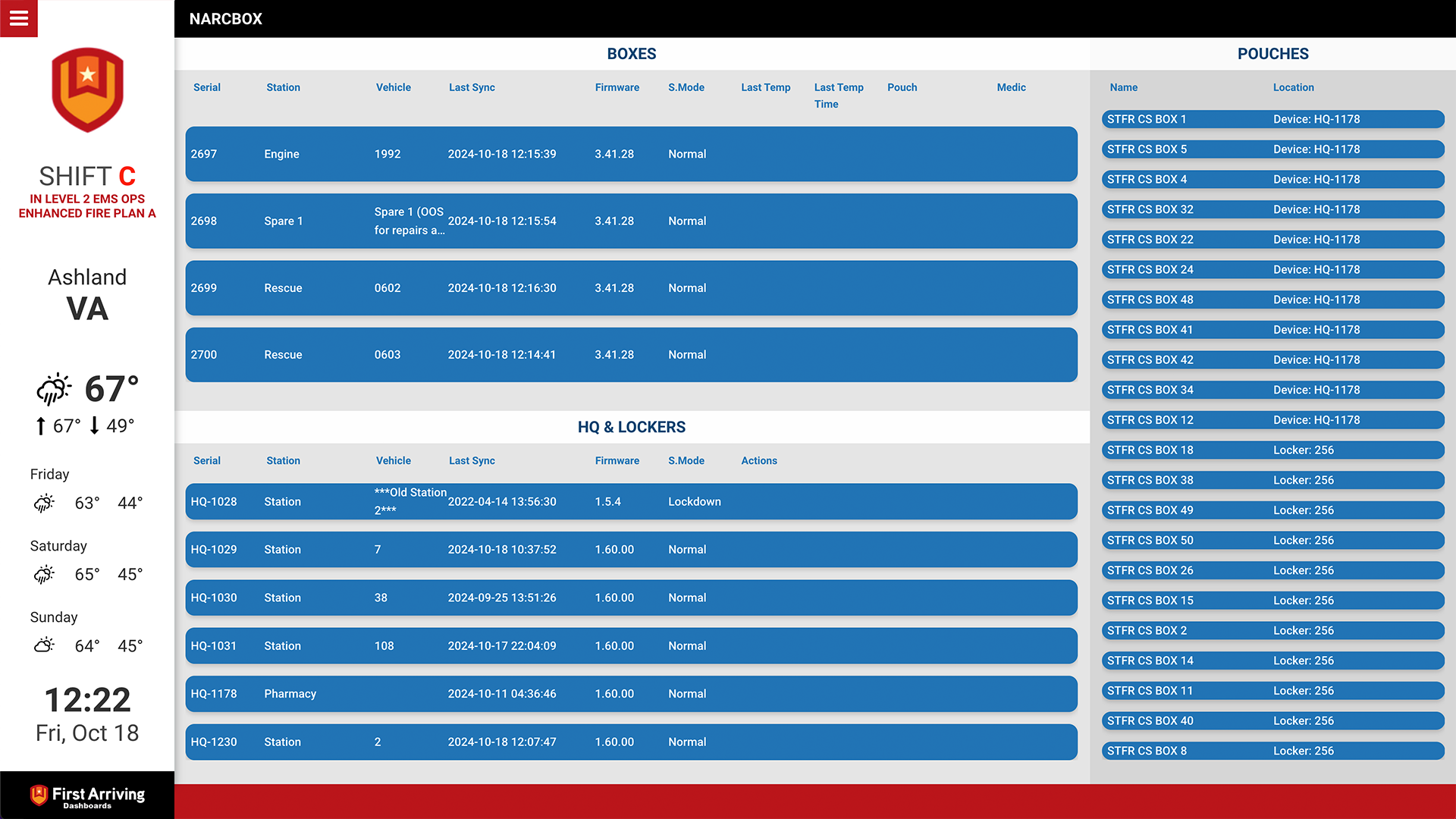
Report on out-of-pharmacy narcotics stored in NarcBox devices directly on the screens in your stations — boxes, lockers and pouches, down to serial number, last sync and last reported temperature.
What we can put on your dashboard
Boxes
- Serial numbers
- Location / unit
- Last sync
- Firmware version
- Mode
- Temperatures
HQ and lockers
- Serial numbers
- Location / unit
- Last sync
- Firmware version
- Mode
- Any actions
Pouches
- Name
- Location
What we need from you
Reach out to your account manager at EMS Logik and request an API key for First Arriving access.
Once you have the key:
Open a ticket at our support center first, then submit the credentials through the First Arriving Secrets Tool and paste the link it generates into your ticket. Please don’t send them by email or chat. Full instructions: Sending First Arriving sensitive information.
Tell us in the same ticket specifically what you want shown from NarcBox — boxes, lockers, pouches, or some combination — and which screens it belongs on.
About vendor charges: data or API access could carry an additional charge, determined by EMS Logik and not by First Arriving.
Example screen
Questions about what the API exposes? Open a ticket at our support center or reach us at dashboards@firstarriving.com.